Building Picpan
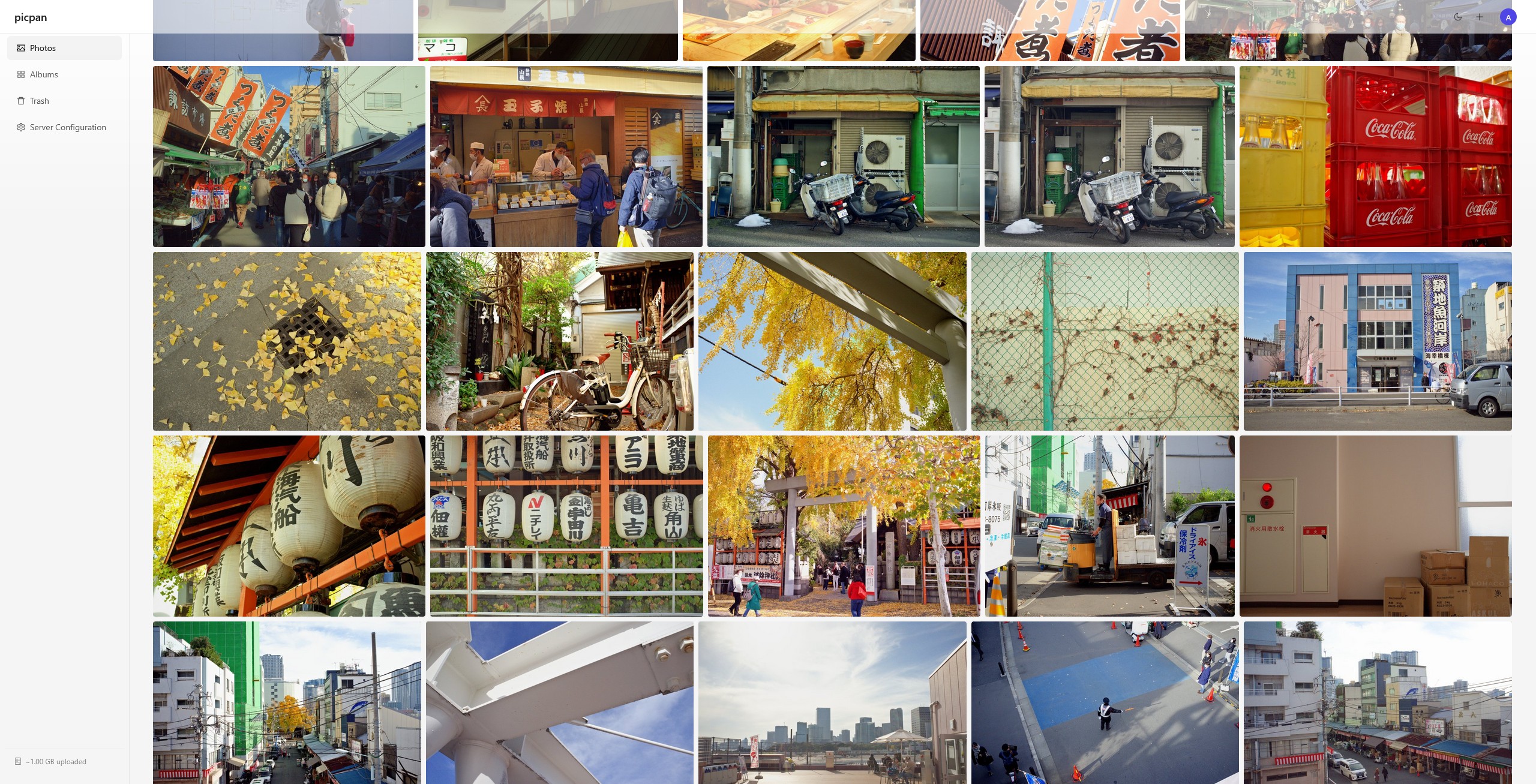
I recently started a new project to build a self-hostable photo gallery without the need to own an expensive homelab or additional storage hardware. Development has reached a point where the app is ready to be shared with the public, so I feel as if this is a good time to do a short writeup on why I built it, how it works, and what will come in the future.
Why
I’ve got quite a few photos I took on a recent trip to China with my family, and I was figuring out how I wanted to share the photos with them. I took 22.8 GB worth of photos on the trip, and even after paring it down to just the ones important/good enough to share, the photos took up way more space than I had available in my ~1.28 GB of remaining space in Google Drive—which is also getting smaller and smaller with every new email I don’t bother to delete from my inbox.
Now… I could just pay an extra $2 per month to bump that up to 86.28 GB of remaining space (which should be plenty of space for at least another 2 or 3 years of photography), but I didn’t really like the idea of creating another dependence on a Google service whose price can just change whenever Google feels like it. Moreover, the moment I go past that 15 GB free limit, cancelling my subscription would mean that I also have to delete extra photos to bring it back down to the free tier storage size.
There’s other photo storage options like Amazon Photos or Ente, but I was feeling very cheap and didn’t want to start paying for a new subscription just to store these photos.
And so the obvious solution to this problem was to just use whatever I already had on hand to develop my own photo storage hosting service. And the things-on-hand in question are:
- A Raspberry Pi1
- A domain name
- An internet connection
Picpan
So the name is a weird word made up of both English and Chinese (because I just came back from China I guess). “Pic” comes from “picture”, and “pan” comes from the Chinese word “盘” (pán) in Mandarin, which is a word that means “disk” in this context—as in a hard disk drive.
The whole ethos driving this project is that there should be a decent way to share photographs to my friends and family without shelling out a crazy number of additional dollars to $OMEGA_CORP. I’m actually inefficiently using Backblaze B2 right now to host certain images on this blog for free, so that inspired me to see if I could somehow make a better app to upload and download images to/from the bucket with a pleasing gallery view.
With that goal in mind, I laid out a general plan of what I needed to do, and had Claude code do most of the heavy lifting afterwards. I knew I was going to need a frontend app to view and add photos, an S3 bucket to store the actual file data in, and a database to add manage albums, accounts, and metadata.
Realistically as a user, I’m actually more worried about losing access to my own photos than I am someone else getting their hands on my photos (although this would still supremely suck). This reflects in Picpan’s encryption architecture which attempts to find a middle-ground between availability and confidentiality, with a slight lean towards availability. This is implemented by storing a unique key per photo in the database (yes, in plaintext). This is the key used to encrypt and recover photos in the S3 bucket, which will live outside of the user’s own hardware. That being said, an attacker who gains read access to the DB necessarily can recover every single photo in the bucket. Scary, but in reality means that the attacker still needs to go through all the effort of decrypting each object individually. If they’re going through that much effort just to be able to see my photos of cool mountains and my family chilling in town, then maybe they’ve earned it. On the flipside, with this looser security model, it becomes easier to help users recover their photos if they ever forget their passwords.
One of the extra features I wanted to bake in was a way to mark photos as “CDN-served”. This becomes useful specifically for my use-case of embedding the pictures on my blog’s gallery and within blog posts. The picture linked up at the top is actually hosted from my Raspberry Pi’s hosted instance of Picpan!
But otherwise everything else just functions like a normal gallery app. You upload photos, you create albums, you look at those albums. Yeah.
The drawbacks
Thus far, I’ve identified a few primary drawbacks that should dissuade someone else using this over something like Immich or Ente:
-
Most S3-compatible object storage services charge non-zero egress fees. If you are consistently viewing and creating albums, you are potentially loading hundreds of images at a given time. If you’re like me, I often spend a long time scrolling through all my old photos. Just viewing the whole gallery once means that I’m spending the full storage amount in egress, and if I’m using Backblaze B2, that’s already 33% of the free egress amount. The idea that you can get charged just for viewing your photos doesn’t seem quite right, and so I have to be careful to find something that won’t charge me for reads.
-
Also as a side-effect of the egress fees, migrating all of your photos into a different object storage service can incur a hefty one-time fee depending on how much data is in the bucket. So while you’re technically able to plug and play whichever buckets you want to use, it’s not really the same if it’s gonna cost you a lot to do it, which sorta defeats the whole “don’t be vendor-locked” idea.
-
Most object storage services have minimum retention periods that apply to all uploaded objects. Deleting an object before its retention duration has expired can incur fees according to the service provider’s terms. They’re not typically short durations either. Wasabi, which is the service that I’ve chosen, has a minimum retention period of 30 days2. This means that if I were to say upload an entire album of photos, then realize that something is wrong with all of the photos and I want to delete them, I actually have to implement some sort of mechanism to abstract them into a “recycle bin” that doesn’t actually delete the object from the bucket yet.
What might come in the future
Whenever I have the time and motivation in the future, I think it’d be rad to setup mobile auto-backup. I haven’t had mobile photo backup enabled since 2021 when Samsung decomissioned Samsung Cloud for photos and moved over to OneDrive. And just last year, it seems like Samsung announced the discontinuation of gallery backup with OneDrive, just 5 years after the first switch-over. In any case, I wouldn’t need to rely on a 3rd party service for backup anymore if I can just integrate with Picpan.
Another feature that I like from Google photos is the ability to post comments on photos. On a few occasions after creating a group album for vacation or event pics, people have left comments on photos they liked or thought were funny. It’s just a neat little interaction that I think makes the photo sharing experience feel a little more fun.
Anyways that’s how it all works right now. I’m glad I have somewhere else to store my photos now without having to worry about costs for a while.
Footnotes
-
Okay I should disclose that I actually had to spend $12 on a Micro SD card reader because I could not for the life of me figure out how to connect back into my Raspberry Pi, so I ended up just reimaging the whole thing (and they also don’t sell Micro HDMI cables at Canada Computers anymore so I couldn’t even connect it to a monitor) ↩
-
Minimum Storage Duration Policy: https://docs.wasabi.com/docs/how-does-wasabis-minimum-storage-duration-policy-work ↩